The problem
A mining company ships packaged product from its warehouses to customers through ports. Planners decide which lots leave the warehouse on which day so each sales order makes its vessel. The data behind that decision was split between a shipping plan kept in spreadsheets, the warehouse system on Oracle, and the dispatch records the warehouse issued.
The client wanted one planning view over those sources and a daily dispatch program the warehouse could act on. Executives also needed a dashboard to follow the plan. The project had a tight deadline.
I was the tech lead and developed the frontend and the backend, working directly with the client and the internal team.
How a dispatch program comes together
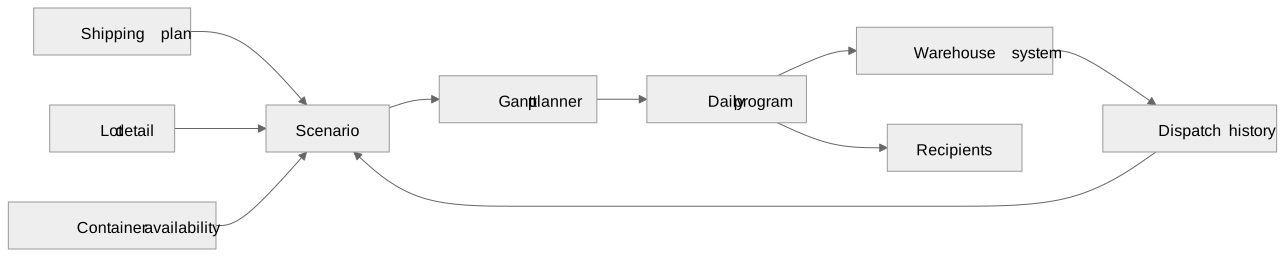
Every import is stored as its own batch with its source and time, whether a planner uploaded a spreadsheet or a scheduled service pulled from a source system. A scenario is a set of batches. Planners choose which batches a scenario uses, and removing a batch takes its rows out of that scenario without touching the others.
Order and lot status
A sales order asks for tonnes and is served by a set of lots , where lot weighs . Each lot is in exactly one state, checked in this order: dispatched when issued dispatch records cover its tonnage, transferred when it moved to an intermediate warehouse, scheduled when a planner gave it a dispatch date, and unscheduled otherwise. Summing lot weights by state gives the order's dispatched , transferred , scheduled , and unscheduled tonnes:
The order takes the status of the first rule that holds:
Each order also has a cut-off date , where is the vessel's arrival at the loading port and is the lead time for the order's dispatch route. With as today, the app sorts orders into three work queues:
For some dispatch routes, the app also warns when a planner schedules more lots of an order than it has containers available.
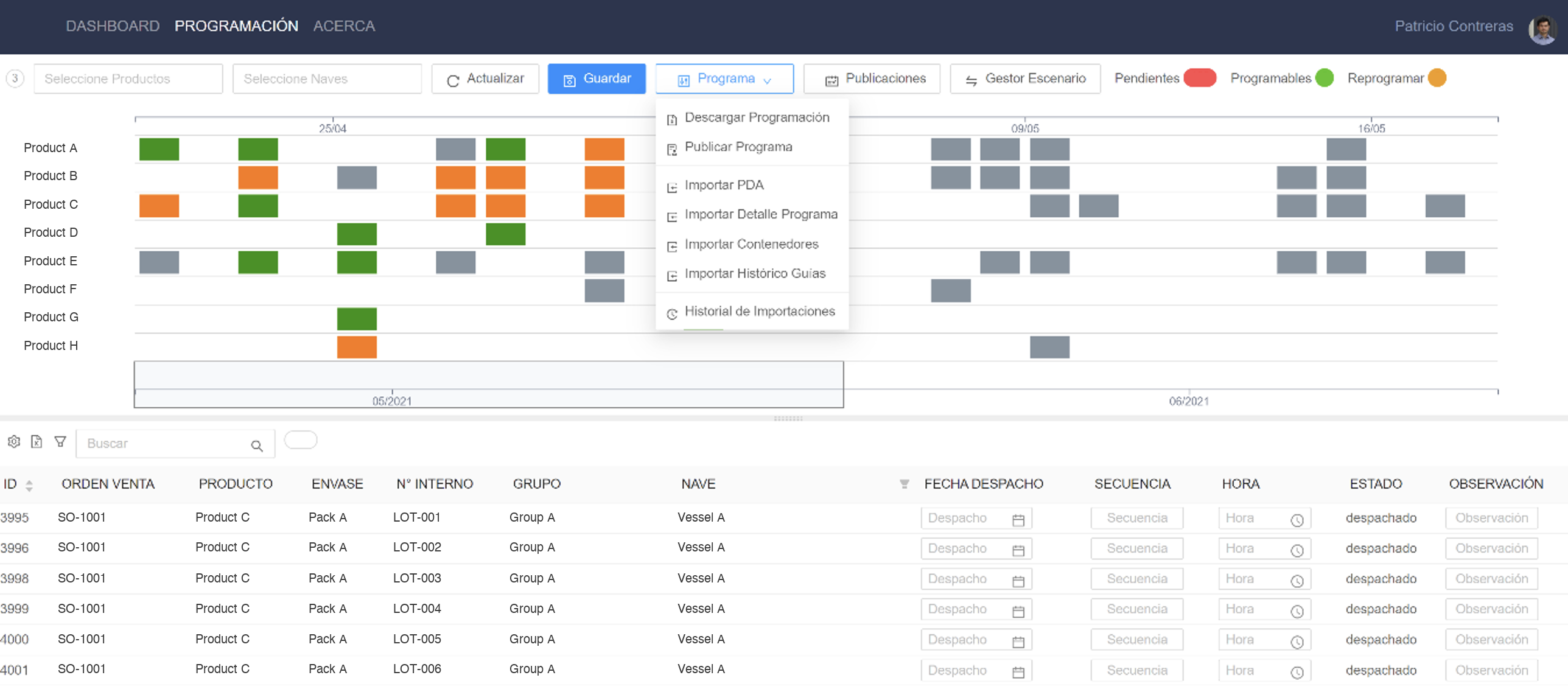
The Gantt planner
The Gantt has one lane per product. Each bar groups the orders for that product with the same cut-off date and shows their total tonnage. Its color follows the status rules above applied to the grouped totals, except that a partial bar also counts dispatched and transferred tonnes as progress. Overdue bars get their own color. A second axis below the chart shows the full range at a coarser scale.
The screen is split in two, with the Gantt on top and a grid of lots below. In the grid, planners set each lot's dispatch date, sequence, time, state, and notes. Filters narrow both views by product and vessel, and badges count the orders in each work queue and open them as lists sorted by arrival date. Every edit recalculates the order's status in the browser, so bars and badges update before anything is saved.
I drew the Gantt with D3.js inside an Angular component, with a linear scale over the scenario's dates and a second axis labeled by month. Spreadsheet imports are parsed in the browser and sent to the API as JSON, and programs can be exported to PDF and Excel.
Publishing the daily program
Publishing takes a date and freezes that day's scheduled lots, joined with the order data the warehouse needs, such as destination, vessel, booking, and storage location. Before publishing, the app checks whether that date already has a publication.
From a publication, planners can do two things:
- Send it to the warehouse system, which writes the dispatch date and sequence onto each lot. Lots from an earlier publication for the same date that are no longer in the program are cleared there, so the warehouse system matches the latest program for that date.
- Email it with the exported file and a comment to a managed list of recipients.
Planners can also pull updates from the warehouse system back into the scenario.
System design
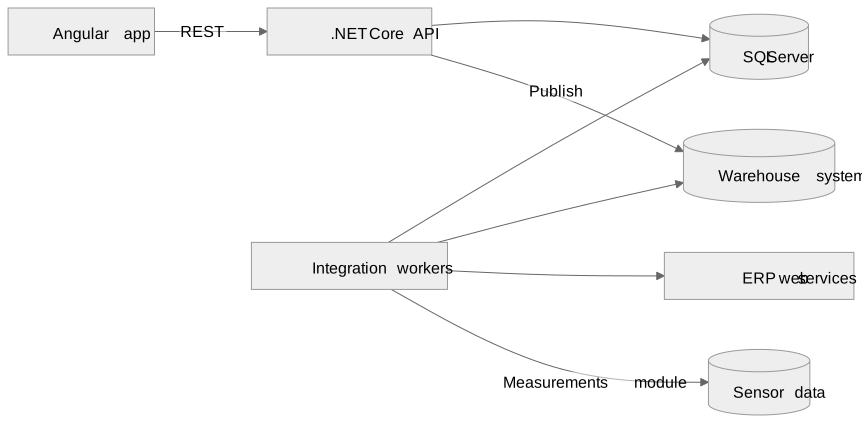
The backend is a .NET Core API with Entity Framework over SQL Server. It runs as a Windows service in the client's datacenter. When an administrator adds a service or changes a worker in the application, the API restarts its Windows service to register the new configuration. Passwords are stored as salted hashes, and the API authorizes requests with JWTs and roles. The frontend is an Angular app that registers a service worker in production.
Configurable integration workers
The integrations run as scheduled services configured in the database. Each service row names its implementation class, a cron schedule, its parameters, and the worker that hosts it. At startup the API registers the service classes listed in that table and starts one hosted worker for each active worker row.
A worker checks every few seconds which of its services are due, queues them, and runs them one at a time. It reloads its configuration on a fixed interval, so a changed schedule or parameter takes effect without a deployment. A failing service logs its error and the others keep running. Users can also run a service on demand from the application.
The first services read dispatch records and stock from views in the warehouse system. When the client later moved those records to its ERP, I added services that call the ERP's web services for dispatch records, inventory, and lots. They map the XML responses, check the result codes, and write into the same import tables, so the planning screens needed no changes.
Real-time measurements
The same backend also served a separate real-time measurements module with its own screens, and the dispatch planner does not use its data. A scheduled service reads the configured variables from the plant's sensor data over a rolling window. A checker then goes through the most recent window for each group of variables and detects stoppages, readings that stop changing, values outside their thresholds, and weighing cycles. It stores the stoppages and weighings it finds and emails alerts.
Trade-offs
Import batches instead of live queries
Planning against stored batches gives planners a stable snapshot and lets them choose which imports a scenario uses. The scenario reflects the last import, so planners run an import on demand when they need fresher data.
Status rules in the browser
Computing status in the browser gives instant feedback while planners edit dates. The dashboard applies the same lot rules to its own summaries and also counts order tonnage not covered by any lot as unscheduled. The rules live in two places and have to change together.
Services configured in data
A new schedule or parameter needs no deployment, and a new source only needs a new service class. Services in the same worker run one after another, so a slow import delays the next one in that worker.
Writing back to the warehouse system
Publishing writes the program into the warehouse system, so warehouse staff see dispatch dates in the tool they already use. Each send asks the planner to confirm before it writes to that system.
Delivery
The software was delivered within the deadline and went into production in the client's datacenter in 2021.
What I brought to it
I turned a process spread across spreadsheets and the warehouse system into a planner with explicit status rules. I also designed the integration workers, which let the later move to the ERP happen by adding services.